前言 mini-Vue 是精简版本的 Vue3,包含了 vue3 源码中的核心内容,附加上 demo 的具体实现。
patch的介绍
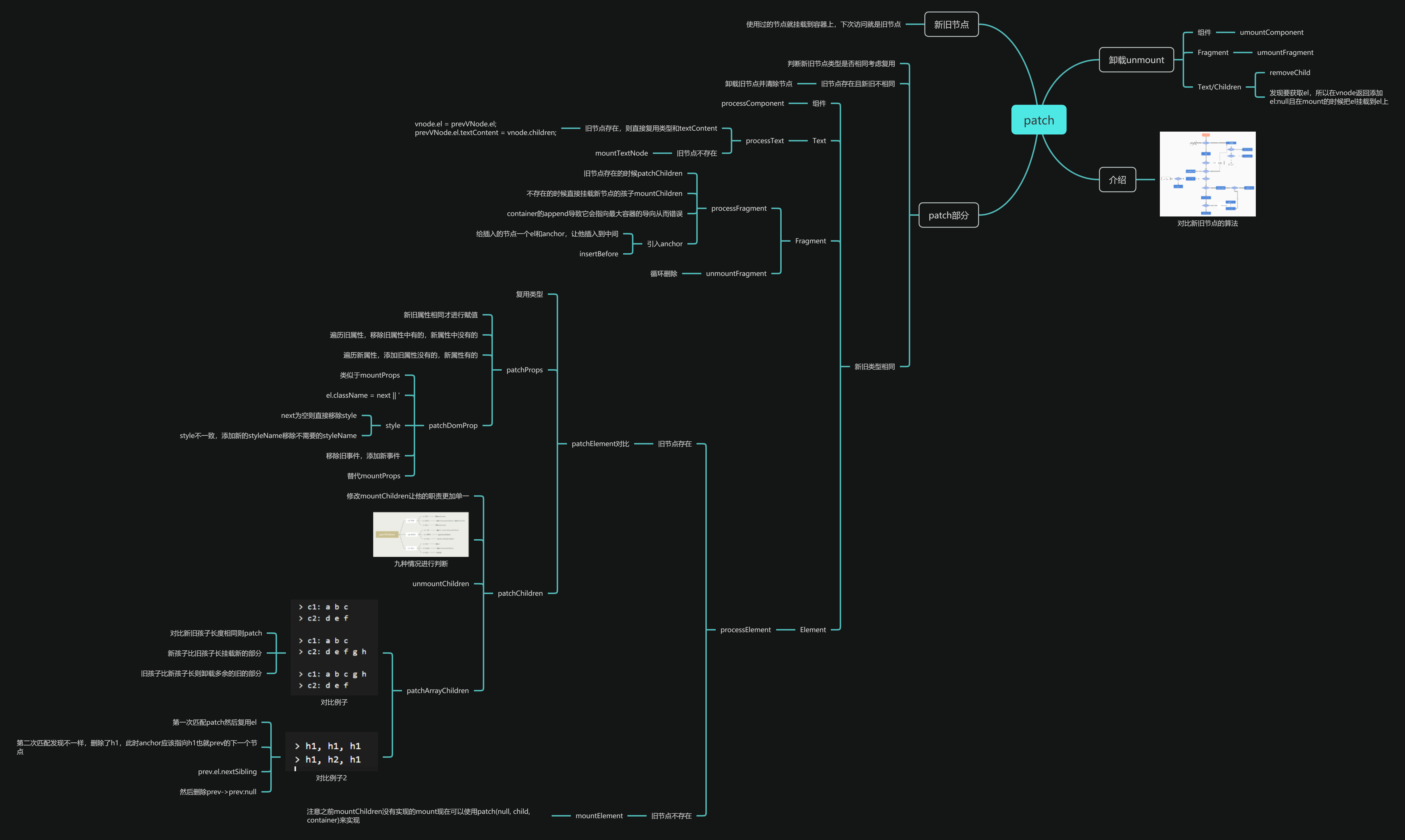
patch 是对比新旧节点的算法,当新节点不存在的时候,执行卸载操作,当新节点存在的时候,进行对比
卸载操作需要判断对应节点的类型,如果是组件执行组件的卸载,如果是 Fragment 执行 Fragment 的卸载,最后到 Text 和 Element 执行 removeChild
patch 操作需要判断新旧节点的类型是否相同,不同的话就要卸载旧的节点将原有的节点树完全卸载掉。
然后再判断新节点processComponent;
新节点如果是 Text 类型,执行 processText。之后再来判断旧节点是否存在,如果存在说明之前已经创建过旧的文本内容了,直接复用这个文本节点,更新他的 textContent,如果不存在旧节点,直接使用 mountTextNode 挂载文本节点
新节点如果是 Fragment 类型,就执行 processFragment,如果此时旧节点不存在,直接使用 mountChildren,如果旧节点存在就要进行 diff
新节点最后就判断为 Element 类型,执行 processElement。之后来判断旧节点是否存在,如果不存在,直接使用 mountElement 对新节点进行挂载。如果存在,则要对他进行 diff 操作了。
因为此时新旧节点的 type 一样,就直接复用 type,只要对 props 和 children 进行 diff
分析完了之后就开始准备写新的 render 函数了
render 我们之前的 render 是挂载了一个节点,怎么才能产生新旧节点呢?
实际上我们只要将 vnode 挂载在 container 上面,下次进入的时候获取 container 上面的 vnode,此时这个 vnode 就是旧节点
1
2
3
4
export function render (vnode, container ) const prevNode = container._vnode; container._vnode = vnode; }
接下来进行判断了,我们首先判断新节点存不存在。
1
2
3
4
5
6
7
8
9
10
11
export function render (vnode, container ) const prevNode = container._vnode; if (!vnode) { if (prevNode) { unmount(prevNode); } } else { patch(prevNode, vnode, container); } container._vnode = vnode; }
接下来就要编写 unmount 和 patch
unmount 前面的情况就是利用 shapeflag 判断组件的卸载或 fragment 的卸载。
1
2
3
4
5
6
7
8
9
10
function unmount (vnode ) const {shapeFlag,el} = vnode; if (shapeFlag&ShapeFlags.COMPONENT){ unmountComponent(vnode) }else if (shapeFlag&ShapeFlags.FRAGMENT){ unmountFragment(vnode) }else { ...? } }
但我们发现最后一种情况:对 Text 或 Element 进行 removeChild 的时候,没有获取到具体的 el,所以我们要从 vnode 里面拿 el,也就是要在 vnode 的返回值里面添加一个 el
1
2
3
4
5
6
7
return { type, props, children, shapeFlag, el : null , };
且在挂载 element 和 textnode 之后需要将 el 挂载到 vnode
1
2
3
4
5
6
7
8
9
10
11
12
13
14
15
16
17
18
function mountElement (vnode, container ) const { type, props } = vnode; const el = document .createElement(type); mountProps(props, el); mountChildren(vnode, el); container.appendChild(el); vnode.el = el; } function mountTextNode (vnode, container ) const textNode = document .createTextNode(vnode.children); container.appendChild(textNode); vnode.el = el; }
所以现在最后一种情况应该这样写了
1
2
3
4
5
6
7
8
9
10
11
12
function unmount (vnode ) const { shapeFlag, el } = vnode; if (shapeFlag & ShapeFlags.COMPONENT) { unmountComponent(vnode); } else if (shapeFlag & ShapeFlags.FRAGMENT) { unmountFragment(vnode); } else { el.parentNode.removeChild(el); } }
patch 接下来是实现 patch 的部分,要通过他判断新旧节点的类型是否相同,设置一个函数。然后分情况。
1
2
3
4
5
6
7
8
9
10
11
12
13
14
15
16
17
18
19
20
function patch (prevVNode, vnode, container ) if (prevVNode && !isSameVNode(prevVNode, vnode)) { unmount(prevVNode); prevVNode = null ; } const { shapeFlag } = vnode; if (shapeFlag & ShapeFlags.COMPONENT) { processComponent(prevVNode, vnode, container); } else if (shapeFlag & ShapeFlags.TEXT) { processText(prevVNode, vnode, container); } else if (shapeFlag & ShapeFlags.FRAGMENT) { processFragment(prevVNode, vnode, container); } else { processElement(prevVNode, vnode, container); } } function isSameVNode (prevVNode, vnode ) return prevVNode.type === vnode.type; }
之后要处理剩下的四个函数 processComponent,processText,processFragment,processElement
processText 存在旧节点的时候,复用旧节点的 textContent。否则执行 mountTextNode,这个前面也写过了。直接 cv 即可。
1
2
3
4
5
6
7
8
9
10
11
12
13
function processText (prevVNode, vnode, container ) if (prevVNode) { vnode.el = prevVNode.el; prevVNode.el.textContent = vnode.children; } else { mountTextNode(vnode, container); } } function mountTextNode (vnode, container ) const textNode = document .createTextNode(vnode.children); container.appendChild(textNode); vnode.el = el; }
processElement 对于存在旧节点的情况下调用 patchElement 进行 diff 比较,不存在的情况则调用原先写过的 mountElement 进行挂载
1
2
3
4
5
6
7
function processElement (prevVNode, vnode, container ) if (prevVNode) { patchElement(prevVNode, vnode, container); } else { mountElement(vnode, container); } }
这里需要注意的一点是 mountChildren 中我们之前是没有实现 mount 的,其实在这里用 patch 实现即可。
1
2
3
4
5
6
7
8
9
10
11
function mountChildren (vnode, container ) const { shapeFlag, children } = vnode; if (shapeFlag & ShapeFlags.TEXT_CHILDREN) { mountTextNode(vnode, container); } else if (shapeFlag & ShapeFlags.ARRAY_CHILDREN) { children.forEach((child ) => { patch(null , child, container); }); } }
除此之外就是 patchElement,因为此时新旧节点的 type 都是一样的,所以将旧节点的 el 赋值给新节点的 el,然后对比它们之间的 props 和 children 的异同。
patchProps 其中包含了两个函数一个是 patchProps 一个是 patchChildren
对于 patchProps,回顾一下 props 的内容,他是一个对象里面有很多属性。
1
2
3
4
5
6
7
8
9
10
{ class : 'a b' , style : { color : 'red' , fontSize : '14px' , }, onClick : () => console .log('click' ), checked : '' , custom : false }
所以我们对于新旧节点的 props,需要取出对应的 value 值,对比是否相同,如果相同我们才去进行重新赋值。并且我们还要遍历旧属性,移除旧属性中有的,新属性中没有的。遍历新属性,添加旧属性没有的新属性有的。
1
2
3
4
5
6
7
8
9
10
11
12
13
14
15
16
17
18
19
20
21
22
23
24
25
26
27
28
29
30
31
function patchProps (oldProps, newProps, el ) if (oldProps === newProps) { return ; } oldProps = oldProps || {}; newProps = newProps || {}; for (const key in oldProps) { if (key === "key" ) { continue ; } if (newProps[key] == null ) { patchDomProp(oldProps[key], null , key, el); } } for (const key in newProps) { if (key === "key" ) { continue ; } if (oldProps[key] !== newProps[key]) { patchDomProp(oldProps[key], newProps[key], key, el); } } }
patchDomProp patchDomProp 这一步操作和我们之前写的 mountProps 有点类似。不过有几个细节要注意:
如果 next 是 false 或者是 null 的话,他就会变成字符串,而不是去掉,我们希望的是去掉。所以要写el.className = next || ''
如果新旧属性中的 style 有不一致的,我们添加新的 styleName,移除不需要的 styleName。
1 2 3 4 5 6 7 8 9 10 11 12 13 14 15 16 17 if (next == null ) { el.removeAttribute("style" ); } else { for (const styleName in next) { el.style[styleName] = next[styleName]; } if (prev) { for (const styleName in prev) { if (next[styleName] == null ) { el.style[styleName] = "" ; } } } }
如果事件中存在旧事件,移除旧事件,如果存在新事件,添加新事件。
1
2
3
4
5
6
7
8
9
10
11
if (/^on[^a-z]/ .test(key)) { const eventName = key.slice(2 ).toLowerCase(); if (prev) { el.removeEventListener(eventName, prev); } if (next) { el.addEventListener(eventName, next); } }
完整代码
1
2
3
4
5
6
7
8
9
10
11
12
13
14
15
16
17
18
19
20
21
22
23
24
25
26
27
28
29
30
31
32
33
34
35
36
37
38
39
40
41
42
43
switch (key) { case "class" : el.className = next; break ; case "style" : for (const styleName in next) { el.style[styleName] = next[styleName]; } if (prev) { for (const styleName in prev) { if (next[styleName] == null ) { el.style[styleName] = "" ; } } } break ; default : if (/^on[^a-z]/ .test(key)) { const eventName = key.slice(2 ).toLowerCase(); if (prev) { el.removeEventListener(eventName, prev); } if (next) { el.addEventListener(eventName, next); } } else if (domPropsRE.test(key)) { if (next === "" || isBoolean(el[key])) { next = true ; } el[key] = next; } else { if (next == null || next === false ) { el.removeAttribute(key); } else { el.setAttribute(key, next); } } break ; }
注意此时我们已经可以利用 patchProps 取代 mountProps 了
1
2
3
4
5
6
7
8
9
10
11
12
13
14
15
function mountElement (vnode, container ) const { type, props } = vnode; const el = document .createElement(type); if (props) { patchProps(null , props, el); } mountChildren(vnode, el); container.appendChild(el); vnode.el = el; }
patchChildren 我们重新修改一下 mountChildren,让他的职责更加单一
1
2
3
4
5
6
7
8
9
10
11
12
13
14
15
16
17
18
19
20
21
22
23
24
function mountElement (vnode, container ) const { type, props, shapeFlag, children } = vnode; const el = document .createElement(type); patchProps(null , props, el); if (shapeFlag & ShapeFlags.TEXT_CHILDREN) { mountTextNode(vnode, el); } else if (shapeFlag & ShapeFlags.ARRAY_CHILDREN) { mountChildren(children, el); } container.appendChild(el); vnode.el = el; } function mountChildren (children, container ) children.forEach((child ) => { patch(null , child, container); }); }
然后开始写 patchChildren,这一部分中,我们需要对九种情况进行判断
简单写一下模板大致如下:
1
2
3
4
5
6
7
8
9
10
11
12
13
14
15
16
17
18
19
20
21
22
23
24
25
26
27
28
29
function patchChildren (prevVNode, vnode, container ) const { shapeFlag : prevShapeFlag, children : c1 } = prevVNode; const { shapeFlag, children : c2 } = vnode; if (shapeFlag & ShapeFlags.TEXT_CHILDREN) { if (prevShapeFlag & ShapeFlags.TEXT_CHILDREN) { container.textContent = c2; } else if (prevShapeFlag & ShapeFlags.ARRAY_CHILDREN) { unmountChildren(c1); container.textContent = c2; } else { container.textContent = c2; } } else if (shapeFlag & ShapeFlags.ARRAY_CHILDREN) { if (prevShapeFlag & ShapeFlags.TEXT_CHILDREN) { container.textContent = "" ; mountChildren(c2, container); } else if (prevShapeFlag & ShapeFlags.ARRAY_CHILDREN) { patchArrayChildren(c1, c2, container); } else { mountChildren(c2, container); } } else { if (prevShapeFlag & ShapeFlags.TEXT_CHILDREN) { container.textContent = "" ; } else if (prevShapeFlag & ShapeFlags.ARRAY_CHILDREN) { unmountChildren(c1); } } }
此时剩下的 unmountChildren 和 patchArrayChildren 两个函数暂未实现,但是我们发现可以对这个模板做一个合并
1
2
3
4
5
6
7
8
if (shapeFlag & ShapeFlags.TEXT_CHILDREN) { if (prevShapeFlag & ShapeFlags.ARRAY_CHILDREN) { unmountChildren(c1); } if (c1 !== c2) { container.textContent = c2; } }
下面一段是 vue 源码的合并结构,虽然简介但是还是分情况比较好理解
1
2
3
4
5
6
7
8
9
10
11
12
13
14
15
16
17
18
19
20
21
22
23
24
25
26
27
28
29
30
31
if (shapeFlag & ShapeFlags.TEXT_CHILDREN) { if (prevShapeFlag & ShapeFlags.ARRAY_CHILDREN) { unmountChildren(c1); } if (c2 !== c1) { container.textContent = c2; } } else { if (prevShapeFlag & ShapeFlags.ARRAY_CHILDREN) { if (shapeFlag & ShapeFlags.ARRAY_CHILDREN) { } else { unmountChildren(c1); } } else { if (prevShapeFlag & ShapeFlags.TEXT_CHILDREN) { container.textContent = "" ; } if (shapeFlag & ShapeFlags.ARRAY_CHILDREN) { mountChildren(c2, container, anchor); } } }
之后我们编写 unmountChildren,其实他也就是遍历 children 然后卸载
1
2
3
4
5
function unmountChildren (children ) children.forEach((child ) => { unmount(child); }); }
然后就到了 patchArrayChildren,这个部分
patchArrayChildren 举个例子,我们看他如何实现
1
2
3
4
5
6
7
8
9
10
11
const n1 = h("ul" , null , [ h("li" , null , "a" ), h("li" , null , "b" ), h("li" , null , "c" ), ]); const n2 = h("ul" , null , [ h("li" , null , "d" ), h("li" , null , "e" ), h("li" , null , "f" ), ]);
c1: a b c
c1: a b c
c1: a b c g h
对比新旧孩子,如果长度相同则执行 patch 对比,如果新孩子比旧孩子长则挂载新孩子多出来的部分,如果旧孩子比新孩子长则删除旧孩子多出来的部分
1
2
3
4
5
6
7
8
9
10
11
12
13
function patchArrayChildren (c1, c2, container ) const oldLength = c1.length; const newLength = c2.length; const commonLength = Math .min(oldLength, newLength); for (let i = 0 ; i < commonLength; i++) { patch(c1[i], c2[i], container); } if (oldLength > newLength) { unmountChildren(c1.slice(commonLength)); } else if (oldLength < newLength) { mountChildren(c2.slice(commonLength), container); } }
接下来就是处理 processFragment 了
processFragment 旧节点存在的时候对比新旧的孩子,不存在时候直接挂载新节点的孩子。
1
2
3
4
5
6
7
function processFragment (prevVNode, vnode, container ) if (prevVNode) { patchChildren(prevVNode, vnode, container); } else { mountChildren(vnode.children, container); } }
先来个例子
1
2
3
4
5
6
7
8
9
10
11
12
13
14
15
16
17
18
19
20
import { render, Fragment, h } from "./runtime" ;render( h("ul" , null , [ h("li" , null , "first" ), h(Fragment, null , []), h("li" , null , "last" ), ]), document .body ); setTimeout (() => { render( h("ul" , null , [ h("li" , null , "first" ), h(Fragment, null , [h("li" , null , "middle" )]), h("li" , null , "last" ), ]), document .body ); }, 2000 );
我们跑这个例子之前,知道这个 Fragment 节点应该是 2s 加入到 first 和 last 中间的,而实际的结果却是他到了最后面。
我们先分析一下原因:首先 patch 新旧节点,它们类型是相同的,是 Fragment,则进入 processFragment。此时旧节点不存在,执行 mountChildren,然后执行 patch,传的值是(null, child, container),到 patch,此时孩子是一个元素节点,所以执行 processElement。之后 mountElement。
这一步就是问题所在了,mountElement 中,我们的 el 是直接挂载到 container 中的,也就是container.appendChild(el);代码。所以他被加到了最后面
为了解决这个问题我们要使用 anchor 属性。
Anchor anchor 属性和 el 类似,因为 Fragment 节点之前挂载到的是容器,所以我们不知道应该在何处插入或者删除我们的 Fragment 节点,就要使用 el 和 anchor 生成节点然后就可以在这两个节点中间插入 Fragment。
所以我们要在 vnode 返回值里面添加 anchor
1
2
3
4
5
6
7
8
return { type, props, children, shapeFlag, el : null , anchor : null , };
然后重新写一下 processFragment
1
2
3
4
5
6
7
8
9
10
11
12
13
14
15
16
17
18
function processFragment (prevVNode, vnode, container ) const fragmentStartAnchor = (vnode.el = prevVNode ? prevVNode.el : document .createTextNode("" )); const fragmentEndAnchor = (vnode.anchor = prevVNode ? prevVNode.anchor : document .createTextNode("" )); if (prevVNode) { patchChildren(prevVNode, vnode, container); } else { container.appendChild(fragmentStartAnchor); container.appendChild(fragmentEndAnchor); mountChildren(vnode.children, container, fragmentEndAnchor); } }
这样的话,就需要在后续的地方增加 anchor 属性了
1
2
3
4
5
6
7
8
9
10
11
12
13
14
15
16
17
18
19
20
21
22
23
24
25
26
27
28
29
30
31
32
33
34
35
36
37
38
39
40
41
42
43
44
45
46
47
48
49
50
51
52
53
54
55
56
57
58
59
60
61
62
63
64
65
66
67
68
69
70
71
72
73
74
75
76
77
78
79
80
81
82
83
function mountChildren (children, container,anchor ) children.forEach((child ) => { patch(null , child, container,anchor); }); } function patch (prevVNode, vnode, container,anchor ) if (prevVNode && !isSameVNode(prevVNode,vnode)) { unmount(prevVNode); prevVNode = null ; } const { shapeFlag } = vnode; if (shapeFlag & ShapeFlags.COMPONENT) { processComponent(prevVNode, vnode, container,anchor); } else if (shapeFlag & ShapeFlags.TEXT) { processText(prevVNode, vnode, container,anchor); } else if (shapeFlag & ShapeFlags.FRAGMENT) { processFragment(prevVNode, vnode, container,anchor); } else { processElement(prevVNode, vnode, container,anchor); } } function processElement (prevVNode, vnode, container,anchor ) if (prevVNode) { patchElement(prevVNode, vnode); } else { mountElement(vnode, container,anchor); } } function mountElement (vnode, container,anchor ) const { type, props, shapeFlag, children } = vnode; const el = document .createElement(type); patchProps(null , props, el); if (shapeFlag & ShapeFlags.TEXT_CHILDREN) { mountTextNode(vnode, el); } else if (shapeFlag & ShapeFlags.ARRAY_CHILDREN) { mountChildren(children, el); } container.insertBefore(el,anchor); vnode.el = el; } function processText (prevVNode, vnode, container,anchor ) if (prevVNode) { vnode.el = prevVNode.el; prevVNode.el.textContent = vnode.children; } else { mountTextNode(vnode, container,anchor); } } function mountTextNode (vnode, container,anchor ) const textNode = document .createTextNode(vnode.children); container.insertBefore(textNode,anchor); vnode.el = textNode; } function processFragment (prevVNode, vnode, container,anchor ) const fragmentStartAnchor = vnode.el = prevVNode ? prevVNode.el : document .createTextNode('' ); const fragmentEndAnchor = vnode.anchor = prevVNode ? prevVNode.anchor : document .createTextNode('' ); if (prevVNode) { patchChildren(prevVNode, vnode, container,fragmentEndAnchor); } else { container.insertBefore(fragmentStartAnchor,anchor) container.insertBefore(fragmentEndAnchor,anchor) mountChildren(vnode.children, container,fragmentEndAnchor); } } ...
总之在需要 anchor 的节点都需要添加 anchor 属性,并且最后的时候需要替换 appendChild 为 insertBefore
之后我们编写遗留的 unmountFragment,这个函数本身我们可以用 unmountChildren 的形式来写,但是现在由于添加了 el 和 anchor 两个文本节点,所以我们要换种方式了。
思路大概就是将他们循环删除
1
2
3
4
5
6
7
8
9
10
function unmountFragment (vnode ) let { el : cur, anchor : end } = vnode; const { parentNode } = cur; while (cur != end) { let next = cur.nextSibling; parentNode.removeChild(cur); cur = next; } parentNode.removeChild(end); }
此时回去测试我们的用例,发现可以成功 patch 了。
最后还有一个小问题,就是关于 patchArrayChildren 里面的。我们看这么个例子
h1, h1, h1
例如,对上面这个例子进行 patchChildren 第一次 patch 时,n2.el = n1.el,没有创建元素,anchor 没有用。 第二次 patch 时,先删除了 n1,对 n2 进行创建,执行 insertBefore,anchor 就需要设置为 n1 的下一个兄弟节点。
1
2
3
4
5
6
7
8
function patch (prevVNode, vnode, container,anchor ) if (prevVNode && !isSameVNode(prevVNode,vnode)) { anchor = prevVNode.el.nextSibling; unmount(prevVNode); prevVNode = null ; } ... }
而如果是
n1, “” n1 “”,
如果 n1 是 Fragment,那么 anchor 应该设置为 n1 的 anchor 的下一个兄弟节点。
所以不妨将两个情况合并为以下的代码
1 anchor = (prevVNode.anchor || prevVNode.el).nextSibling;
总结 在本节里,我们学习了patch算法简单的对新旧节点进行比对,然后根据对应的情况去挂载新节点或删除旧节点,后面又重新编写了render方法来对我们之前的操作做一些补充和修改。下节将进行核心diff算法的学习。